↳ Meridian — Issue 01, May 2026

Plain files, quiet software.

Meridian is a local-first markdown editor for desktop — macOS and Windows ship from the same GitHub release. No cloud, no sync agent, no subscription.

§ 01 — The editor

A real markdown editor, not a wrapper.

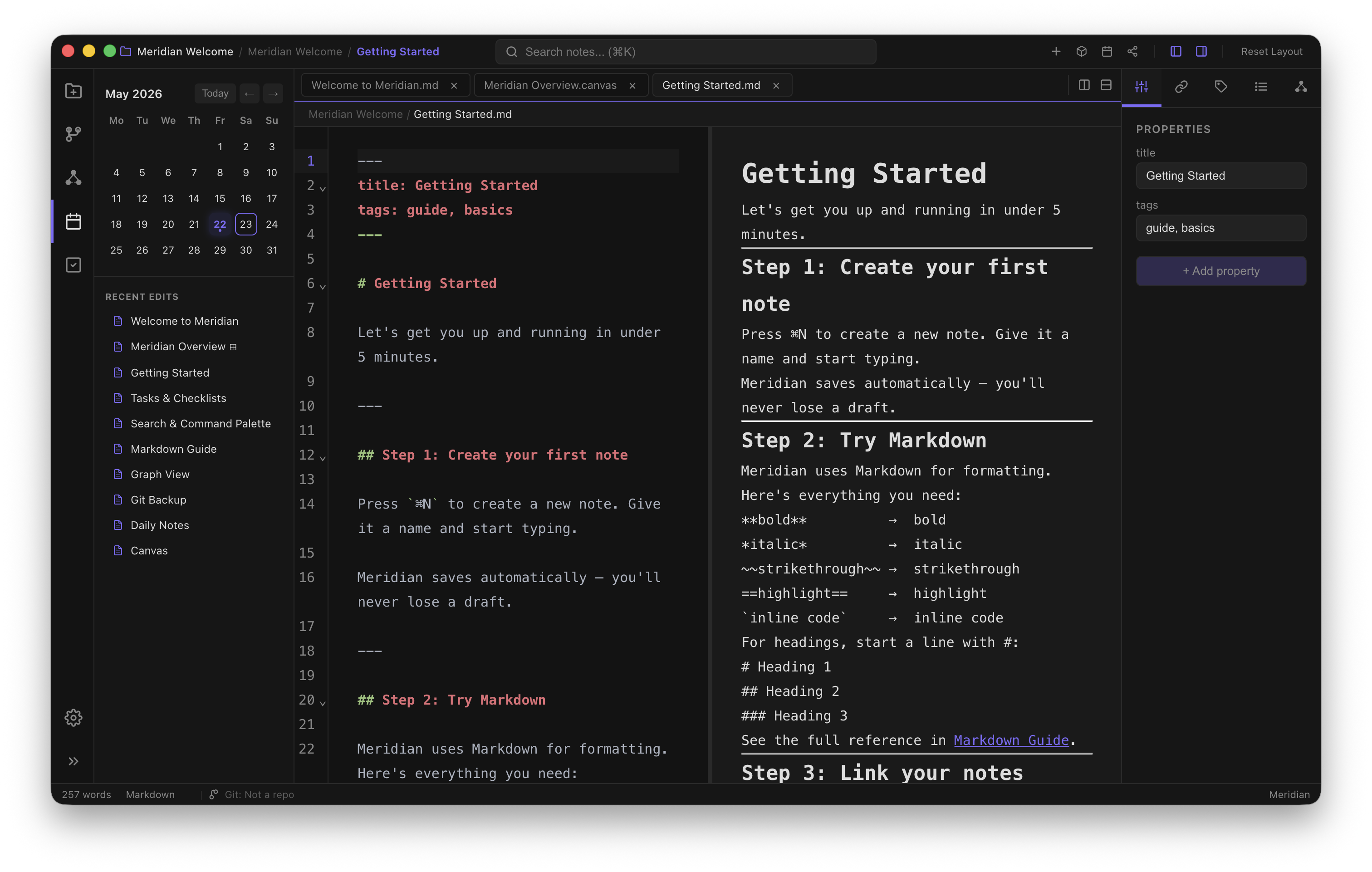
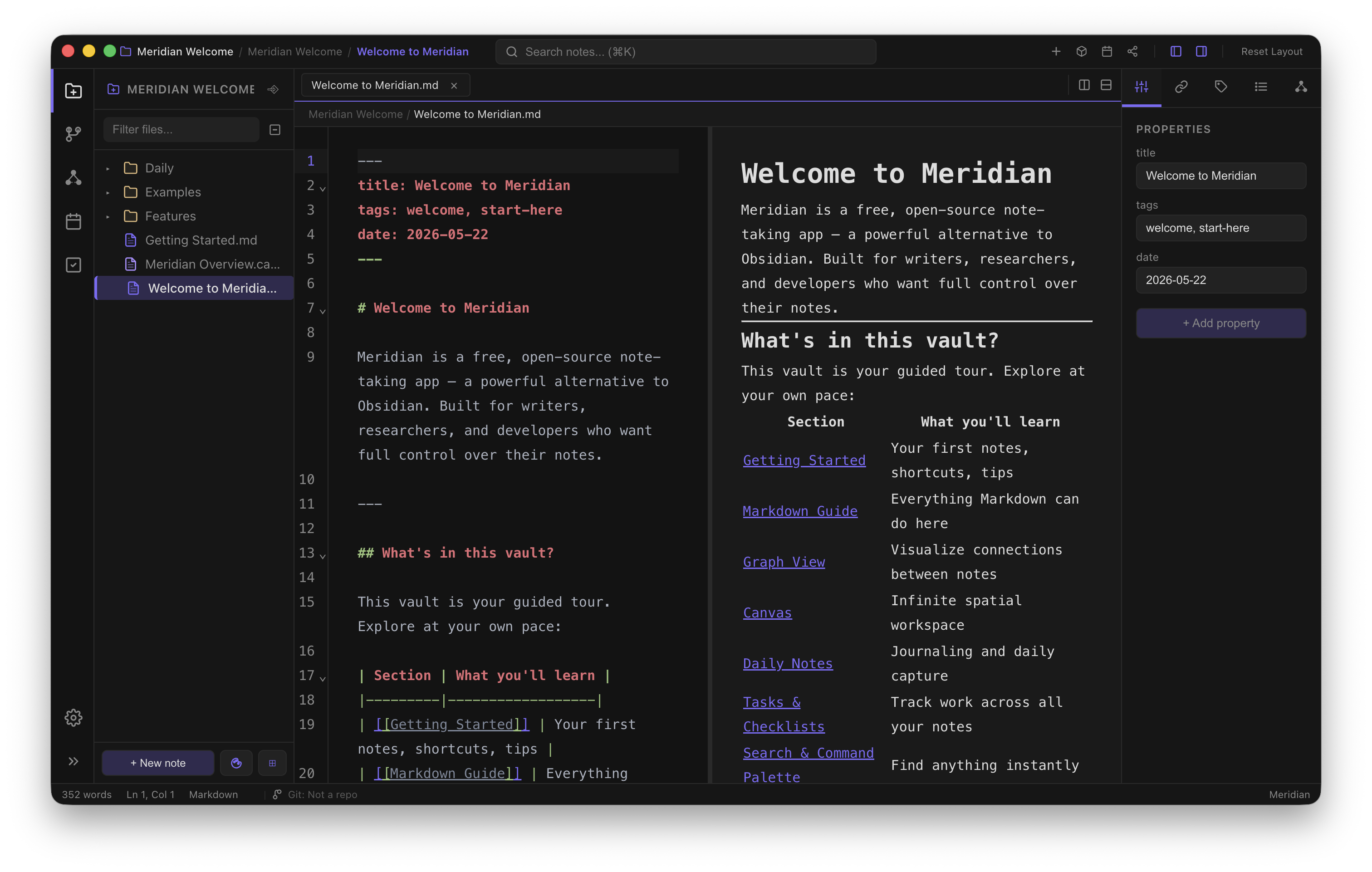
The Meridian editor with markdown content and a quiet, focused interface.
Fig. 02 — Tasks parse from GFM checkboxes and surface in the tasks panel. 06-tasks-markdown.png

The editor isn't a webview around a text box. It is CodeMirror 6 configured exactly the way a markdown writer wants: invisible until you need it, generous when you do.

Wiki-links autocomplete as you type. Cmd-click a link to follow it. Slash commands open a tight palette of headings, lists, tables and callouts. Tasks parse into a separate panel. Embedded images render inline. Nothing reaches out to the network.

"A note for every day, without thinking about it. ⌘D opens today. Templates fill in the rest."

Auto-save fires on blur, on ⌥⇥, or on a debounced timer. If you'd rather the writing be deliberate, switch it to manual and keep ⌘S in your fingers.

CodeMirror 6 with split panes, drag-and-drop tabs, slash commands, autosave on blur or ⌥⇥. Wiki-links, GitHub Flavored tables, Mermaid and Obsidian-style callouts render live.

§ 02 — Three things it does well

Three more tools, one workspace.

01 — Knowledge graph

See how your notes connect.

Every backlink is computed from your file system. No database, no sidecar service. Open the graph and you see exactly what your notes already say about each other: dense clusters where you wrote a lot, lonely orphans you forgot about, and the occasional bridge note that connects two ideas you did not know were related. Nothing about this graph is suggested by an algorithm. It is just the shape of your own work, as you wrote it.
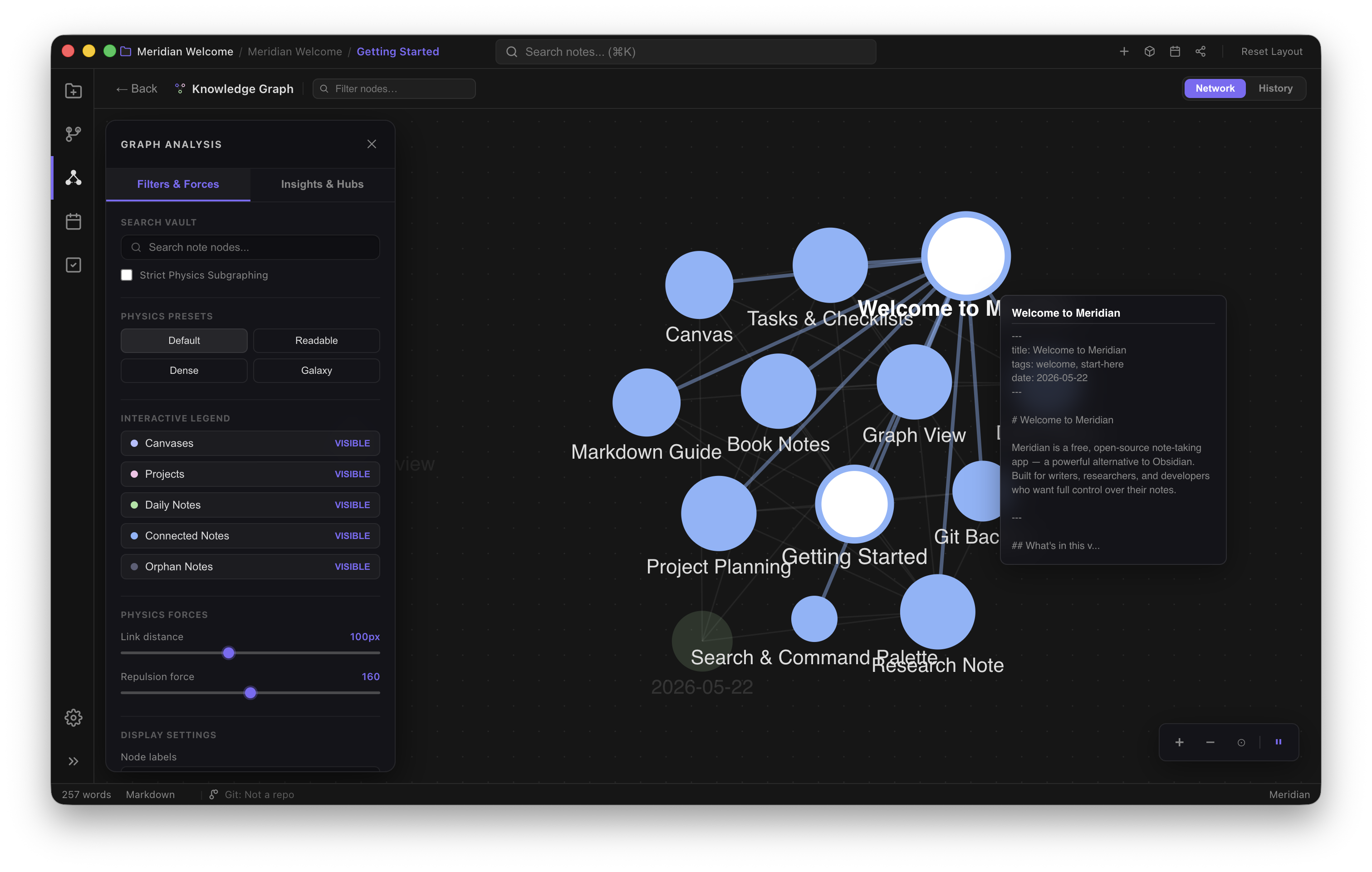
See how your notes connect.
Spatial thinking when text isn't enough.
02 — Canvas

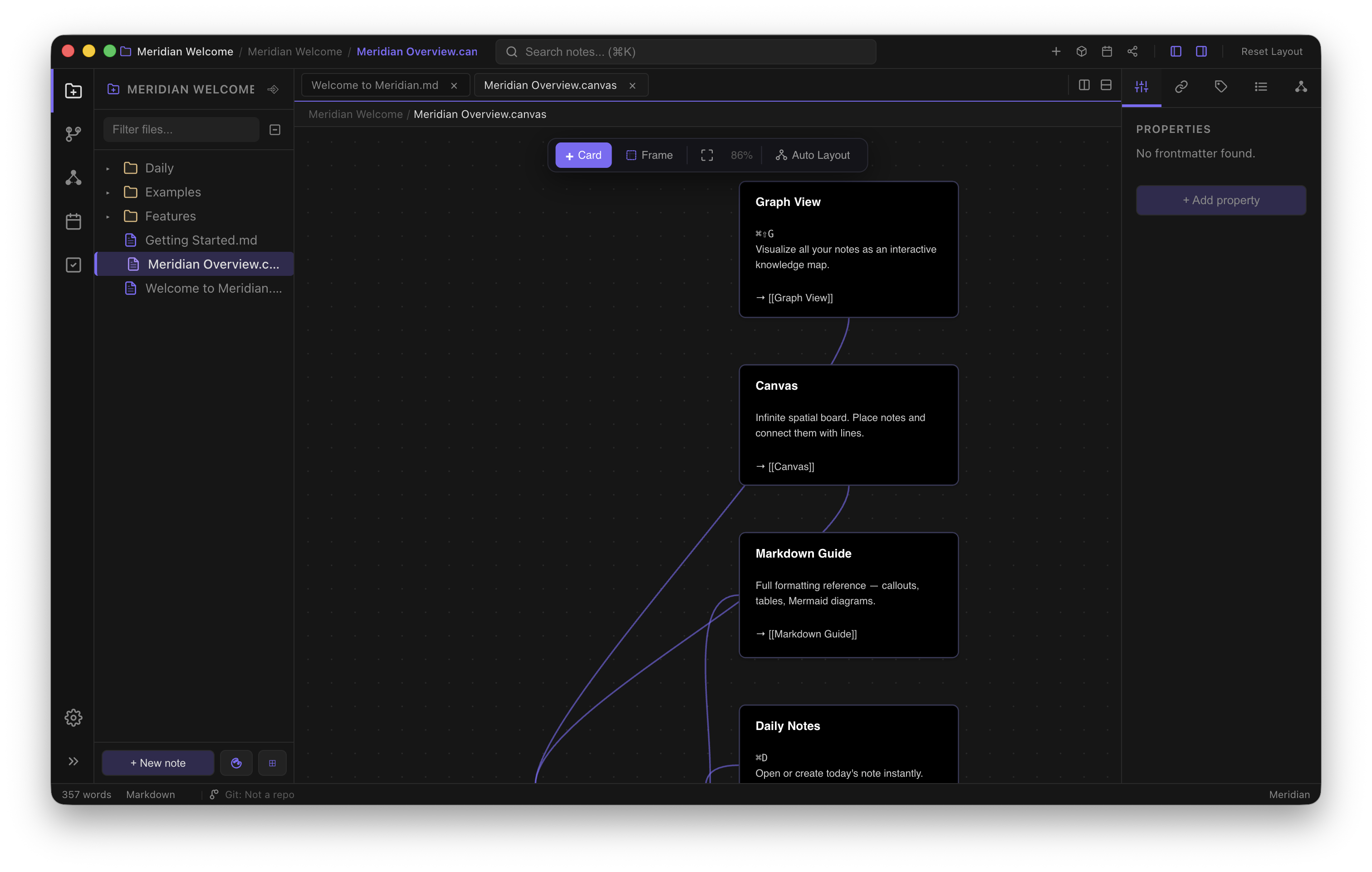
Spatial thinking when text isn't enough.

Drop notes onto a canvas, draw arrows, write directly on the surface. Each card is the same plain markdown file you can open elsewhere. Save the canvas as a plain JSON next to your notes. There is no proprietary container, no service to export from later. You own the layout the same way you own a sketchbook.

03 — Daily notes

A note for every day, automatically.

A new file each morning, named for the date, opened with one keystroke. Templates are real markdown files on disk that you can edit yourself. There is nothing magical happening underneath: a folder, a date, a file.

The calendar surfaces what you have written and where the gaps are. Links from today's note are propagated into the graph and the canvas without ceremony. It is the simplest possible journal, and that is the point.

A note for every day, automatically.
§ Principles

Why local-first.

§ 01

Your files stay yours.

Meridian writes plain .md files to a folder you pick. Open them in TextEdit, vim, or Obsidian. There is no database, no proprietary format, no export step.

§ 02

Works without a connection.

The app does not require an account or a server to function. Open it on a plane, on a boat, in the basement. Search, link, edit. Sync later if you want — over iCloud, Dropbox, Syncthing, or git.

§ 03

No subscription. One license.

Source-available under Apache 2.0. Download once, use forever. When the next version ships, you decide whether to update.

§ Themes

Eight themes, five accents.

Switch with ⌃⇧1…7, or keep it on the default Midnight. Each theme is a small palette, not a re-skin — typography, spacing and density stay constant.

Dark
default
Calm dark base with a purple accent. The default.
Midnight
⌃⇧1
Deep ink-blue, for late nights.
Indigo
⌃⇧2
Papery indigo, a touch warmer to read.
Cyberpunk
⌃⇧3
Sharp neon. For short bursts and high contrast.
Forest
⌃⇧4
Muted evergreen, low saturation.
Nord
⌃⇧5
The classic cool Nord palette.
Dracula
⌃⇧6
The well-known Dracula palette: purple, pink, mint.
Obsidian
⌃⇧7
Neutral graphite, near-achromatic.
§ Plugins

Bring your own features.

Drop a folder into .meridian/plugins/ and Meridian picks it up with hot reload. Register commands, react to vault events, render side panels. Plain ESM, no build step required.

Themes, commands, sidebar panels, custom blocks, file decorations — all the same shape. If you can write JavaScript you can change Meridian.

app.commandsregister / invoke
app.workspacepanels, layout, focus
app.editordecorations, completions
app.vaultread, write, watch
Read the plugin guide
word-counter / main.js JavaScript · ESM
// .meridian/plugins/word-counter/main.js
 
export default class WordCounter {
  onLoad(api) {
    api.registerCommand({
      id:   'word-counter:show',
      name: 'Word Counter: Show stats',
      run: () => {
        const t = api.editor.getActiveText() ?? '';
        const n = t.trim().split(/\s+/).filter(Boolean).length;
        api.ui.toast(`${n} words`);
      },
    });
  }
}
§ Download

Get it. Run it. Keep your files.

Download Meridian for macOS or Windows from the latest GitHub release.

First launch: right-click the app → Open → confirm once. Subsequent launches work normally.